

There are a myriad of software tools made specifically to serve the needs of engineers. Tools for calculating, drawing, designing, modelling and many more. If you are inclined to just selecting the most suitable one and getting on with your work, you have a perfectly reasonable approach. Feel free to skip this article. If, on the other hand, you are one of those curious souls that has spent countless hours learning all the customisation options of these tools, encoding workflows using their custom scripting languages, or better yet, designing your own custom spreadsheets, then continue reading.
I’m a believer that there are no absolute rights or wrongs when it comes to choosing a tool to solve a problem. The success or failure in solving a particular problem, will not only depend on the tool used, but also on the way it is used, your level of proficiency and expertise, and sometimes, a bit of luck. As long as you can effectively solve the problem in front of you, pick what feels comfortable and makes sense to you.
In this article, I will highlight some of the most common tools you need to develop your own software applications, big or small. I’ve written the recommendations below based on my own experience. I have successfully solved problems in the field and in the office using a combination of the tools below. So most of it is based on my own toolbox.
Whilst there are definitively very capable commercial options, I tend to favour free and open-source tools when available. It has been rare to find a problem that haven’t been able to solve using an open-source alternative to a commercial product. Without further ado, let’s get into it.
Spreadsheets
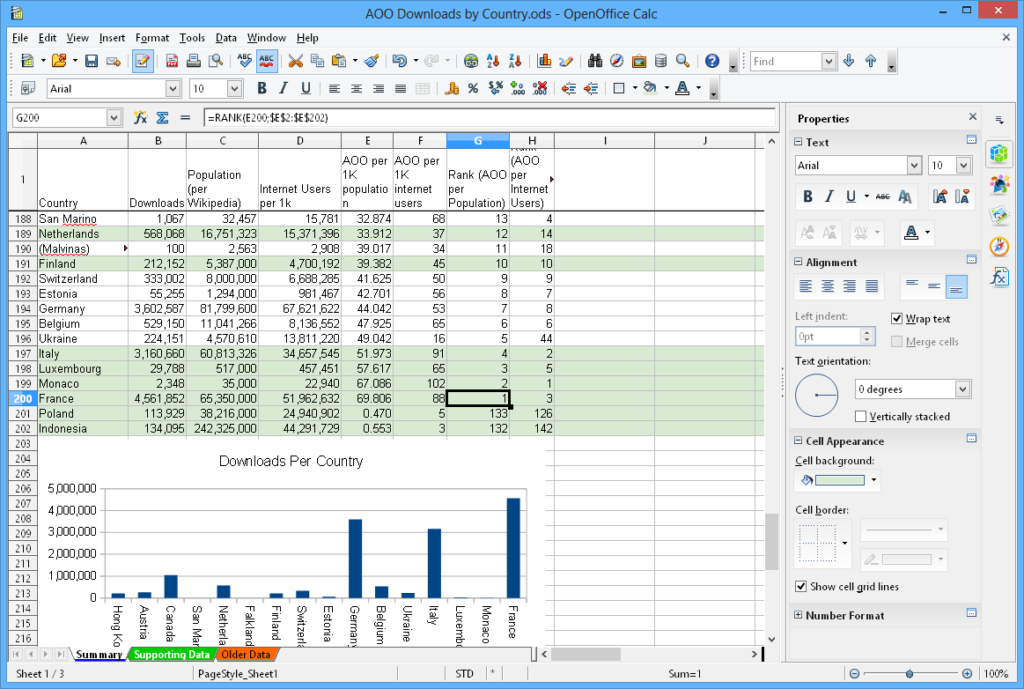
Over the years much has been said about spreadsheets, both good and bad things. The popularity and ubiquity of spreadsheets in every professional field is not a coincidence. The brilliance of the first spreadsheet program, VisiCalc, created in 1979, remains to this day. The paradigm is simple, yet extremely powerful. The arrangement of “cells” in a uniform grid of rows and columns in which you can store any type of data and perform a wide range of calculations is simply genius. You might not know it but, when developing a spreadsheet, you are actually programming in a functional style.
The simplicity and power of this tool makes it a very easy choice for many situations. Over the years I have used it for all sorts of purposes, from visualising electrical engineering concepts, like harmonics or symmetrical components, to using them as a work instruction production automation tool or a Dissolved Gas Analysis interpreter when analysing oil tests on power transformers.
As a side benefit of using spreadsheets, as you stretch them to their breaking point you will gain a great intuition on when it is time to switch to a more robust tool. In this sense, spreadsheets are great as prototyping tools, for quickly testing and discarding ideas, iterating over data models and landing on optimal solutions.
These days spreadsheets include the ability to be programmed and extended using Python as well as the AI functionality that seemingly has to be in every software known to man.
While commercial products like Excel are dominant in this space, there is a range of equally capable and compatible open-source solutions like Apache OpenOffice Calc, which is a default in many Linux distros.
Regardless of the particular flavour, a good spreadsheet program should definitively be part of any engineer’s toolbox.
Numerical Computing
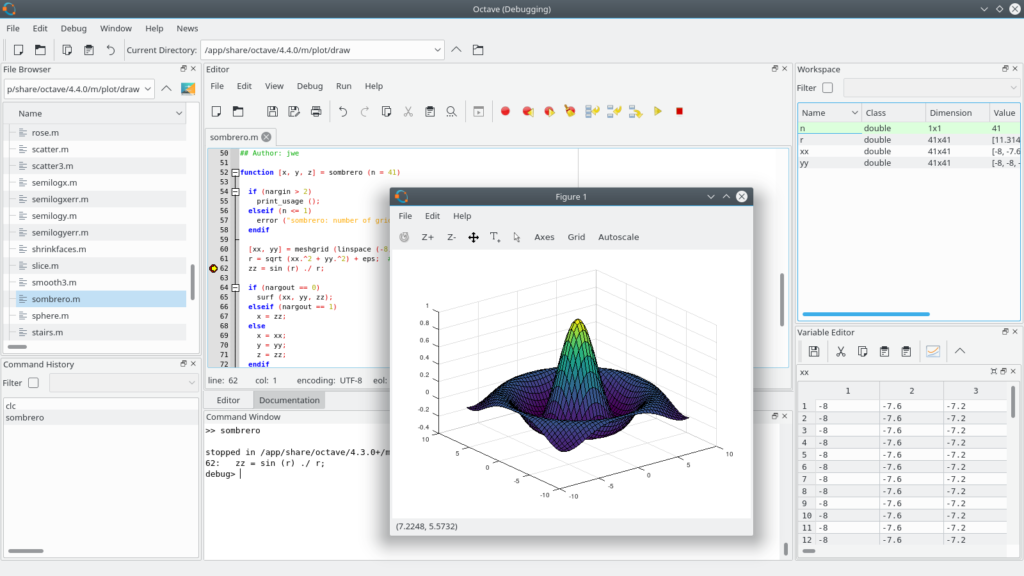
For more advanced mathematical modelling, you will need something more robust and specialised than spreadsheets. Moving towards raw programming, there are mathematical programming and modelling suites available, often classified under the category of Numerical Computing tools. These suites were developed to address the needs of heavy numerical calculations.
Often taught at Universities, these tools allow the student, or engineer, to encode the laws of physics that model a particular phenomena. These are useful for any discipline, whether you are calculating mechanical stress distributions or electromagnetic field propagation, these tools are a good choice. The downside is that they present a bit steeper learning curve compared to spreadsheets and not everyone will be able to modify or interact with them.
On the commercial side of this space, tools like Matlab or Analytica have been around for a few decades. On the open-source equivalents, there are very capable tools like GNU Octave or SageMath.
Whilst not as widely used and applicable in more specific scenarios, numerical calculation tools should also be part of your toolbox.
Text Editors
When you can’t quite solve your problem with an existing tool, you need to resort to the most flexible and powerful tool of all, developing your own. This is where things get interesting and fun. Creating a piece of software from scratch can be one of the most effective and practical ways to solve a particular problem. Developing a custom program is essentially a blank canvas on which you can create exactly the tool you need.
At the heart of programming is a programming language. A programming language allows you to express the instructions that implement the algorithms and modelling calculations that solve your specific engineering challenge.
Programming is done by typing text. This text will be interpreted or compiled by the computer in order to execute your instructions and produce an output. It is no coincidence that professional programmers spend much of their time typing into a text editor.
A good text editor will go a long way into making you a productive programmer. It will allow you to organise and turn your ideas into code. Whilst you could use a program as simple as Notepad or Notepad++ to edit text, you have may other options when it comes to text editors.
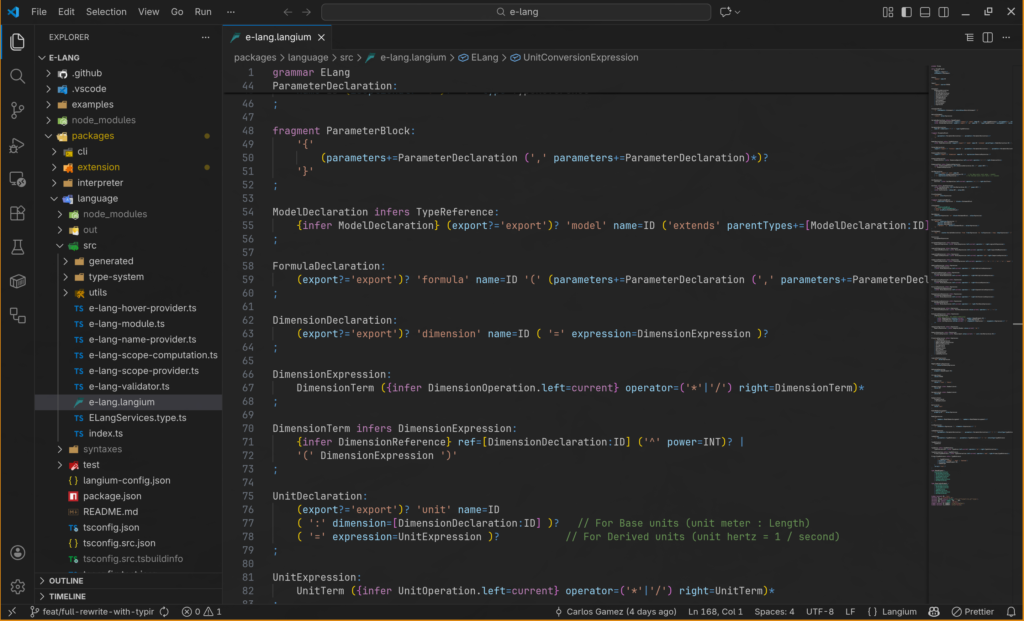
A common and effective modern text editor is Visual Studio (VS) Code. This tool offers a great user experience and runs in all operating systems, Windows, MacOS and Linux. VS Code has also spawned a large ecosystem of extensions. These extensions augment the native capabilities of the program to offer specialised assistance for different languages and features. There are extensions to highlight code, format it, run it, test it, connect to databases and many many more. Being open-source, VS Code has also given rise to other editors that are based on it, but offer additional capabilities like deep AI-coding integrations for example.
Some companies offer other editors that focus on specific languages or better integration into some ecosystems. A step above raw text editors, are what is known as Integrated Development Environments (IDEs). These provide even more comprehensive software development features. These IDE’s are often used by large software development teams, who need to share and coordinate the development of large software projects.
For the purpose of developing tools for your own use, adding a good text editor to your toolbox will be more than sufficient.
Compilers and Interpreters
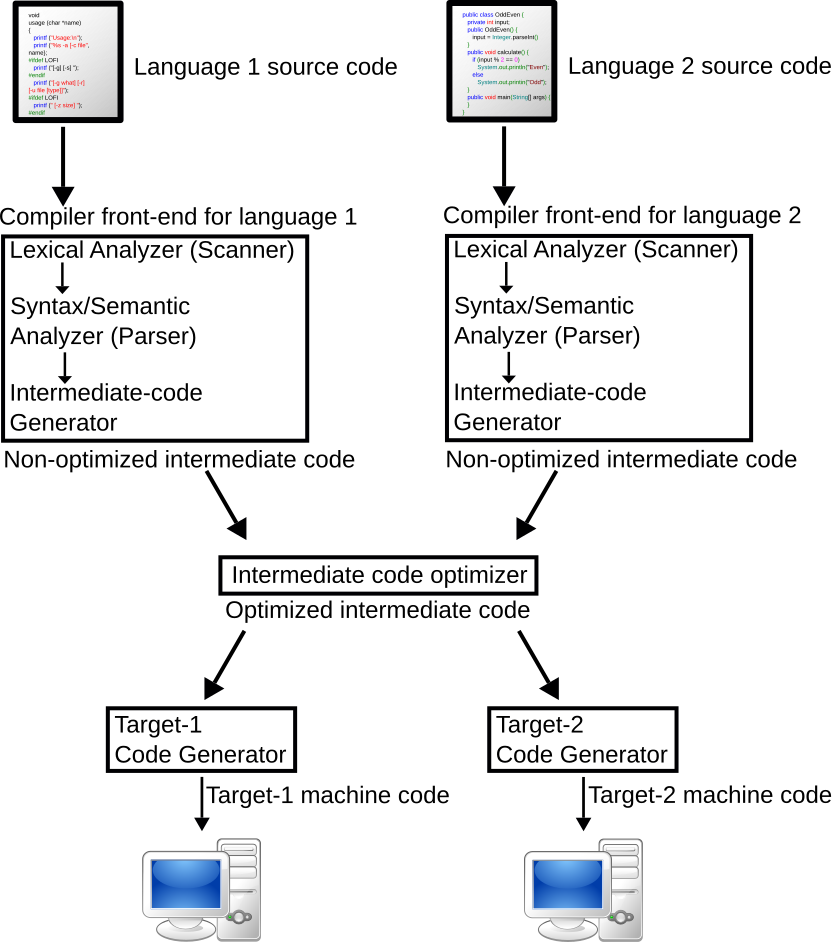
Depending on what programming language you chose to develop your solutions, you will need either a compiler or an interpreter for that language. Both of these allow you to run your programs and get the results.
The list of compilers and interpreters is as long as the list of available programming languages. This is a vast topic to discuss here and the selection of a programming language will be a topic for a future article.
Various outlets and software organisations do yearly surveys to rank programming languages by popularity. These are useful, but not mandatory, guides on what the software industry is using at the moment. Organisations that publish these lists include Stack Overflow, IEEE and Coursera amongst many others.
Final Thoughts
Choosing the right software tool is rarely about finding a single “perfect” solution; it’s about assembling a versatile kit that evolves with your challenges. Whether you are using a spreadsheet to model a quick prototype or firing up a text editor to architect a specialized calculation engine, the goal remains the same: transforming complex engineering problems into clear, executable solutions.
By mastering these fundamental tools—from the functional logic of OpenOffice Calc to the high-performance numerical modeling of GNU Octave, and finally the absolute creative freedom of a text editor like VS Code—you stop being just a user of software and start becoming its architect. You bridge the gap between “standard” methods and the unique, innovative workflows that your specific projects demand.
The journey doesn’t end with picking a text editor or a numerical suite. The real power lies in the language you choose to speak within those tools. In our next article, we will dive deep into the world of Programming Languages—comparing the strengths of C#, Python, and PHP, and helping you decide which syntax is best suited to breathe life into your next engineering masterpiece.
Until then, I encourage you to pick one repetitive task in your current project and try to solve it with one of the tools mentioned above. You might be surprised at how quickly “laziness” can turn into your most productive engineering trait.